Menu
The interactive on-display menu system. Provides navigation between available modes using hardware buttons. This is the default interactive mode for panels with input controls.
Quick Start
How It Works
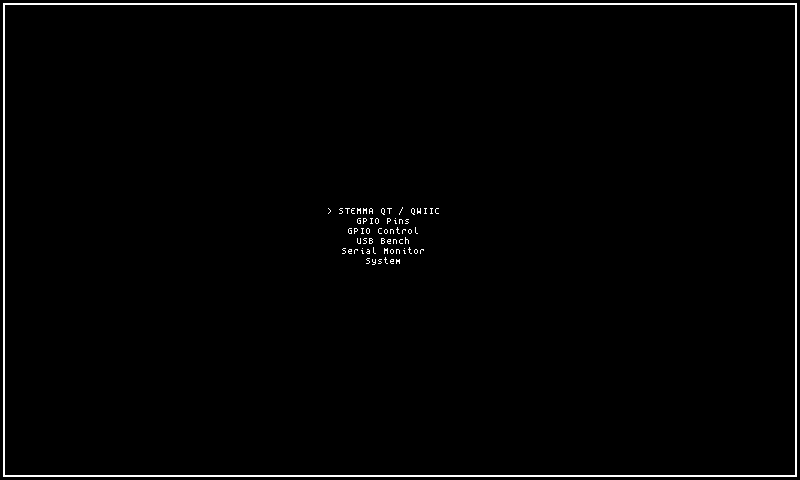
The menu mode renders a vertical list of selectable text entries — one per available top-level screen — with a cursor highlight on the currently selected row. The list items are fixed strings sourced from an internal registry of navigation destinations (STEMMA QT / QWIIC, GPIO Pins, GPIO Control, USB Bench, Serial Monitor, System), and the display is static between input events, redrawing only when the user moves the cursor or selects an entry. When the mode activates, it always starts with the cursor on the first entry and the list scrolled to the top.
The display updates are event-driven: a redraw occurs only when a directional button press moves the cursor up or down, or when the primary button triggers navigation to another mode. There is no periodic refresh — the menu holds its rendered state indefinitely until user input causes a state change.
The data source is the hardcoded list of navigation targets built into the mode. If the items list were ever empty (which cannot occur in normal operation), the mode would display a single "(no menu items)" placeholder row. The cursor position and visible scroll window are tracked internally, with automatic scroll windowing when the list exceeds the panel's visible row count.
The style option controls the visual frame presentation:
- framed (default) — renders the menu list inside an 8-pixel decorative tile border that covers the full panel bounds. Content is inset from the border, providing visual separation and a polished look. Requires a minimum panel size of 32×32 pixels.
- plain — renders the menu list with no border or decoration, maximizing the content area. Text rows fill the full panel width with zero padding. Works on panels of any size including the smallest OLEDs.
Note
The menu is the default mode for panels with input controls. Panels without input skip the menu and default to dashboard instead.
Options
| Key | Type | Description | Default | Allowed Values |
|---|---|---|---|---|
| style | string | Visual frame style for the menu | framed | framed, plain |
Configure options via the CLI:
Tip
Use style=framed for a bordered menu with visual separators, or style=plain for a minimal undecorated list.
CLI Examples
Activate the menu mode on the main region:
Set the menu style to framed:
Switch to a plain undecorated layout:
Query the current menu settings:
Input Actions
| Input | Action |
|---|---|
| K1 / Primary | Open/select highlighted entry |
| K2 / Up | Move selection up |
| K3 / Down | Move selection down |
Panel Compatibility
The menu mode requires input controls (buttons or joystick) for navigation and selection. Panels without input pins cannot use this mode — they default to the dashboard instead. On monochrome panels, the selection highlight uses inverse video. The menu adapts its item count and font size to the available panel height.
| Capability | Description | Behavior |
|---|---|---|
| MonoFast | Fast-refresh monochrome OLED (128×32, 128×64, 128×128) | Supported — requires input controls. Inverse-video selection cursor, compact item list |
| MonoSlow | Slow-refresh monochrome e-ink (122×250, 176×264, 200×200, 296×128, 400×300, 480×800, 800×480) | Supported — requires input controls. Static menu list, refreshes on navigation input |
| GrayscaleFast | Fast-refresh grayscale (160×80, 240×135, 240×240, 320×240, 480×320, 800×480) | Supported — requires input controls. Grayscale highlight bar with smooth scrolling |
| GrayscaleSlow | Slow-refresh grayscale e-ink (122×250, 176×264, 200×200, 400×300, 800×480) | Supported — requires input controls. Static menu, refreshes on navigation input |
| ColorFast | Fast-refresh color TFT (128×128, 160×80, 240×135, 240×240, 320×240, 480×320, 800×480) | Supported — requires input controls. Color highlight bar with icons and smooth scrolling |
| ColorSlow | Slow-refresh color e-ink (122×250, 176×264, 200×200, 400×300, 800×480) | Supported — requires input controls. Static color menu, refreshes on navigation input |
This is the default mode for panels that have input. When a panel has input enabled and no explicit default mode is configured, the system selects menu automatically.
Related Pages
- Display Modes — overview of all available modes
- Getting Started: CLI Usage — introduction to
cyberhudctlcommands - Configuration — persistent configuration options
- Dashboard — default mode for panels without input controls
Snapshots
Mono